Core Concepts
Before diving into Pinmok, taking a few minutes to understand its overall architecture will make everything that follows much easier to grasp. This chapter contains no hands-on steps — it's here to give you a clear picture of how the system is structured and how its parts relate to each other.
What Is Pinmok
Django Admin is a powerful tool, but its design is Model-centric — every admin page corresponds to a data model, navigation is generated automatically, and customization is limited. Once your business logic goes beyond CRUD, you often end up spending more time working against the framework than building features.
Pinmok removes these constraints while remaining fully compatible with Django Admin. Admin pages are no longer limited to models — any business function can have its own backend page. Developer-defined menus merge with Django Admin's auto-generated model menus to form a complete navigation structure, freeing you from the framework's default behavior. Site configuration is managed centrally, so backend behavior can be adjusted at runtime without touching code. UI components and styles have been rewritten with full compatibility for Tabler, a mature and modern Bootstrap 5 framework, so you can quickly compose layouts using existing frontend skills.
All of this is achieved by extending Django Admin from within — inheriting and replacing the core AdminSite. The benefit of this approach
is that everything Django Admin offers is preserved: the registration system, the permission model, the URL structure — all unchanged.
Pinmok extends on top of this foundation rather than starting from scratch. Existing projects can adopt it with minimal effort, and
developers already familiar with Django Admin can get up to speed almost immediately, gaining a more flexible and capable backend
development platform in return.
Architecture Overview
The following diagram illustrates how Pinmok's layers relate to each other:
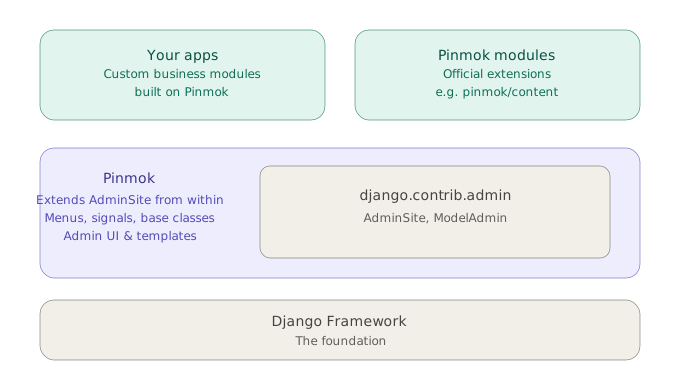
At the base is the Django framework itself — the foundation everything runs on. Pinmok is installed as a set of Django apps: pinmok/core
handles replacing AdminSite, providing menu definitions, signals, and base classes; pinmok/padmin handles the backend UI, views, and
templates.
Building on top of this system is no different from building any ordinary Django app — you're working with the same familiar app structure, views, templates, and URL configuration. There's nothing new to learn. Pinmok provides the backend interface ready to go, with styles fully compatible with Bootstrap 5, so you can handle layout using your existing frontend knowledge. Whether you're installing an official Pinmok module or developing your own, the integration path is exactly the same. In short, Pinmok hands you an open Admin — it builds the scaffold, and the rest is yours to fill in.
Namespace Package Structure
All Pinmok modules share the pinmok top-level namespace, but each is an independent Python package that can be installed on its own or
combined as needed. This relies on Python's namespace package mechanism — the pinmok/ directory has no __init__.py, and it's
precisely this design that allows multiple independent packages to share the same namespace prefix.
If you install via pip, all of this is handled automatically and requires no attention. But if you choose to copy the source directly into
your project directory, there is one thing to be careful about: do not add an __init__.py to the pinmok/ directory. Its absence is not
an oversight — once added, the namespace package mechanism breaks, and modules like pinmok/core and pinmok/padmin will fail to load.
Keep the directory structure intact and follow the integration steps in this documentation, and you won't run into any issues.
Core Modules
pinmok/core
core is the foundation layer of the entire system, providing globally shared capabilities for all modules. It defines the site class that
inherits and replaces Django's native AdminSite, the menu data structures and construction methods, signals, foundational permission
handling, a multilingual model base class, and general-purpose base classes and utilities such as TreeNode. core implements no business
logic of its own — it exists solely to provide definitions and infrastructure for the layers above it.
pinmok/padmin
If core is the foundation, padmin is the building constructed on top of it. It is the heart of Pinmok, responsible for implementing all
the backend functionality that developers and users interact with. Built on the base classes and definitions provided by core, padmin
carries out the full business logic of the Django Admin extension: menu construction, storage, caching, and synchronization all happen here;
backend views, templates, static assets, and UI components are all provided here; site configuration read/write, route alias resolution, and
other supporting features are here too. Everything you see in the browser, and everything running behind it, is padmin's work. For
developers, whether you're registering pages, defining menus, or building interfaces with backend components, padmin is what you'll be
working with most.
Menu System
Django Admin's built-in navigation is generated automatically by the framework based on registered models. The structure is fixed, ordering cannot be customized, and there is no way to include non-model pages. This works fine for pure CRUD use cases, but as soon as you want the backend to handle more complex business functions, the existing mechanism becomes a constraint rather than a convenience.
Pinmok addresses this with a dedicated menu system. Menus are the entry point for modularity — each app can define its own menu items, which the system collects and manages centrally. Custom menus are merged together with Django Admin's existing model menus, and developers can freely specify the ordering to produce a complete navigation structure. Any business function, whether or not it corresponds to a model, can appear in the backend navigation where it belongs.
This design lets the navigation structure reflect your business needs, not your data models.
Site Configuration
A backend system typically needs to manage a range of configuration items — site name, logo, contact details, feature toggles, and so on.
The common approach is to scatter these across individual apps' settings.py files or hardcode them into templates, requiring a code change
and redeployment every time something needs to be updated.
Pinmok provides centralized site configuration management, allowing these items to be edited directly in the backend interface and taking effect immediately without touching any code. Each module manages its own configuration independently without interfering with others, but everything is in one place and easy to maintain. The goal of this design is straightforward: make backend behavior genuinely configurable. Developers own the configuration, users own the operation, and the place to manage it all is the backend itself — right where you need it.